

Photos in the More Icon Contest Bases & Samples album of GoldToken Support
GoldToken Support has a total of 73 photo album. You can view a list of the albums.
The album is sorted by Date, click to sort by name.
You are viewing the detailed list, click to switch to the brief one.
This album contains 65 photos.


Created Using the Semi Easy Ferret/Dragon/Weasel/Fox Base

Several copies were made with the image a little higher to the top each time, and then animated using GIMP.
29 Oct 2011 at 2:24AM


Howling Wolf Base

To edit, save this PNG image to your computer and color each wolf in the image, making the background a solid color or transparent using your photo editing program or Microsoft Paint. Cut/crop the images up using your photo editing software (each one should be exactly the same size or the animation might not work correctly), and combine at iaza.com to animate.
If you don't repeat the boxes as specified, the animation will look kinda funny - it will look like your wolf is having a very hard time deciding whether or not to howl. If you want the howl longer, just repeat box five like, 10 times or something. If you want the regular wolf longer, repeat that box for 10 times.
Base designed by DreyaCira
29 Oct 2011 at 9:39PM
Easy Bear/Wolf Paw Base

To edit, save this GIF image to your computer and color the bear in the image, making the background a solid color or transparent using your photo editing program or Microsoft Paint.
29 Oct 2011 at 9:34PM
Dance Base for Experienced Animators

To edit, save this image to your computer and take apart with your photo program. Color each graphic in the image, making the background a solid color or transparent using your photo editing program or Microsoft Paint. Combine with your photo program or at iaza.com to animate.
29 Oct 2011 at 9:37PM
Easy Face Base

To edit, save this GIF image to your computer and color the image, making the background a solid color or transparent using your photo editing program or Microsoft Paint.
29 Oct 2011 at 9:34PM
Easy Creature Base

To edit, save this GIF image to your computer and color the creature in the image, making the background a solid color or transparent using your photo editing program or Microsoft Paint.
29 Oct 2011 at 9:34PM
Easy Animal Base

To edit, save this GIF image to your computer and color the animal in the image, making the background a solid color or transparent using your photo editing program or Microsoft Paint.
29 Oct 2011 at 9:35PM
Easy Wolf Base

To edit, save this GIF image to your computer and color the wolf in the image, making the background a solid color or transparent using your photo editing program or Microsoft Paint.
29 Oct 2011 at 9:33PM
Wolf Name Base

To edit, save this GIF image to your computer, change Name to your account name and color the wolf in the image, making the background a solid color or transparent using your photo editing program or Microsoft Paint.
30 Oct 2011 at 12:03AM
Person/Baby Base

To edit, save this GIF image to your computer, add clothing and hair and color the person/baby in the image, making the background a solid color or transparent using your photo editing program or Microsoft Paint.
30 Oct 2011 at 12:04AM
Dance Base for Experienced Animators

To edit, save this image to your computer and take apart with your photo program. Color each graphic in the image, making the background a solid color or transparent using your photo editing program or Microsoft Paint. Combine with your photo program or at iaza.com to animate.
30 Oct 2011 at 12:32AM
Dog Base for for Experienced Animators

To edit, save this image to your computer and take apart with your photo program. Color each graphic in the image, making the background a solid color or transparent using your photo editing program or Microsoft Paint. Combine with your photo program or at iaza.com to animate.
30 Oct 2011 at 12:32AM
Person Base for Experienced Animators

To edit, save this image to your computer and take apart with your photo program. Color each graphic in the image, making the background a solid color or transparent using your photo editing program or Microsoft Paint. Combine with your photo program or at iaza.com to animate.
30 Oct 2011 at 12:32AM
Very Easy Person Base

To edit, save this GIF image to your computer and color the image, adding clothing and hair, keeping the background transparent using your photo editing program or Microsoft Paint.
30 Oct 2011 at 12:29AM
Happy Person Base for Experienced Animators

To edit, save this image to your computer and take apart with your photo program. Color each graphic in the image, making the background a solid color or transparent using your photo editing program or Microsoft Paint. Combine with your photo program or at iaza.com to animate.
30 Oct 2011 at 12:32AM
Running Horse Base for Experienced Animators

To edit, save this image to your computer and take apart with your photo program. Color each graphic in the image, making the background a solid color or transparent using your photo editing program or Microsoft Paint. Combine with your photo program or at iaza.com to animate.
30 Oct 2011 at 12:32AM
Easy Wolf/Dog Base

To edit, save this GIF image to your computer and color the wolf in the image, making the background a solid color or transparent using your photo editing program or Microsoft Paint.
30 Oct 2011 at 12:27AM
Easy Wolf Base

To edit, save this GIF image to your computer and color the wolf in the image, making the background a solid color or transparent using your photo editing program or Microsoft Paint.
30 Oct 2011 at 12:27AM
Easy Cat Base

To edit, save this GIF image to your computer and color the cat in the image, keeping the background a solid color or transparent using your photo editing program or Microsoft Paint.
30 Oct 2011 at 12:29AM
Get Down Base for Experienced Animators

To edit, save this image to your computer and take apart with your photo program. Color each graphic in the image, making the background a solid color or transparent using your photo editing program or Microsoft Paint. Combine with your photo program or at iaza.com to animate.
30 Oct 2011 at 12:37AM
Glow Stick Base
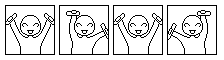
To edit, save this PNG image to your computer and color each image, making the background a solid color or transparent using your photo editing program or Microsoft Paint. Cut/crop the images up using your photo editing software (each one should be exactly 50x50 pixels or the animation might not work correctly), and combine in order with your photo editing software, or iaza.com to animate.
30 Oct 2011 at 1:13AM
Easy Bug/Plush Base

To edit, save this GIF image to your computer and color the image, keeping the background transparent using your photo editing program or Microsoft Paint.
30 Oct 2011 at 12:44AM
Dog Couple Base for 2 Icons
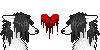
To edit, save this PNG image to your computer. Color the image using your photo editing program or Microsoft Paint. Cut/crop the image in half to make two icons, renaming them when you do so. Be sure they are both exactly 50x50 pixels, and save as GIF.
30 Oct 2011 at 12:43AM
Wolf Couple Base for 2 Icons
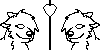
To edit, save this PNG image to your computer. Color the image using your photo editing program or Microsoft Paint. Cut/crop the image in half to make two icons, renaming them when you do so. Be sure they are both exactly 50x50 pixels, and save as GIF.
30 Oct 2011 at 12:41AM
MS Paint + iaza Animation Tutorial - Page 1
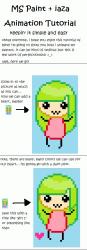
To be continued on page 2 ------>>>>>
30 Oct 2011 at 1:33AM
MS Paint + iaza Animation Tutorial - Page 2
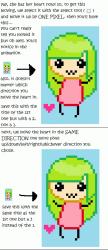
To be continued on page 3 ------>>>>>
30 Oct 2011 at 1:34AM
MS Paint + iaza Animation Tutorial - Page 3
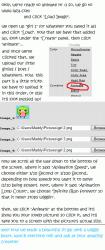
A special
 for this tutorial goes to chocolate rainbows.
30 Oct 2011 at 1:36AM
Pixel Tutorial - Page 1

You will need Microsoft Paint, or your favorite photo editing software for this tutorial. Continue to page 2 ----->>>>>
30 Oct 2011 at 2:02AM


Pixel Tutorial - Page 4

A special
 to cupcake kitty for creating this tutorial.
 30 Oct 2011 at 2:05AM
Bouncing Animation Tutorial - Part 1 - Making Layers
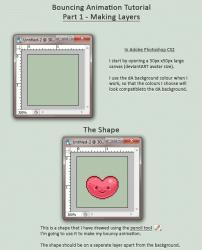
Continue to Page 2 ------>>>>
30 Oct 2011 at 3:33AM
Bouncing Animation Tutorial - Part 1 - Making Layers
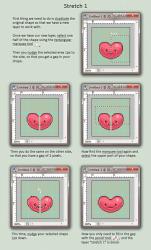
Continue to Page 3 ------>>>>
30 Oct 2011 at 3:34AM
Bouncing Animation Tutorial - Part 1 - Making Layers
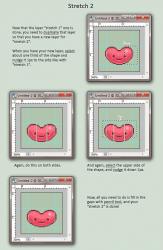
Continue to Page 4 ------>>>>
30 Oct 2011 at 3:34AM
Bouncing Animation Tutorial - Part 1 - Making Layers
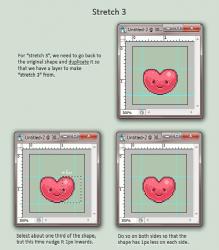
Continue to Page 5 ------>>>>
30 Oct 2011 at 3:34AM
Bouncing Animation Tutorial - Part 1 - Making Layers
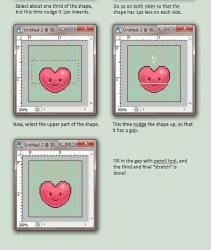
Special
to thedeathofsen for creating this tutorial. 
30 Oct 2011 at 3:36AM
Bouncing Animation Tutorial Part 2 - The Animation Begins
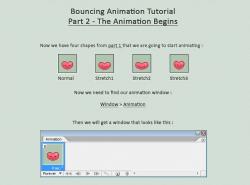
Continue to page 2 ------->>>>
30 Oct 2011 at 4:49PM
Bouncing Animation Tutorial Part 2 - The Animation Begins
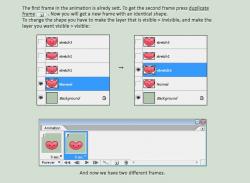
Continue to page 3 ------->>>>
30 Oct 2011 at 4:49PM
Bouncing Animation Tutorial Part 2 - The Animation Begins
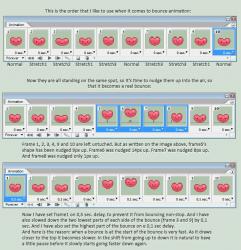
Continue to page 4 ------->>>>
30 Oct 2011 at 4:49PM
Bouncing Animation Tutorial Part 2 - The Animation Begins
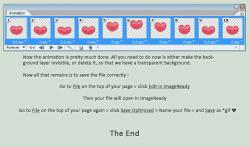
Special
to thedeathofsen for creating this tutorial. !30 Oct 2011 at 4:51PM
Created Using the Bouncing Animation Tutorial

A huge
goes to thedeathofsen for creating this tutorial. 30 Oct 2011 at 4:55PM

